From sketch to a vibe-qc calculation input
Prepare an ethanol geometry and a gas-phase B3LYP/def2-SVP single-point input for vibe-qc. This is a small example of the preparation workflow, not a method recommendation for every chemical problem. Writing the input requires only vibe-sketch; executing it requires a working vibe-qc installation.
Generate the geometry
Open the ethanol document from Your first molecule, or create a new document and import
CCOthrough Import ▾ → SMILES….Check C2H6O, charge 0, and multiplicity 1 in the species card.
Click Generate 3D. The species’ 3D row should now identify the geometry method and 9 atoms: three heavy atoms and six hydrogens. Read any reported warnings before continuing.
The structure comes from distance geometry followed by a force-field optimization. It is a starting geometry, not the result of the requested quantum-chemical calculation. 3D structures describes conformers, stereochemistry checks and force-field limitations.
Choose the input settings
In Inputs, set the fields explicitly so an earlier saved choice does not change the example:
Field |
Value |
|---|---|
program |
vibe-qc (script) |
task |
single point |
method |
B3LYP |
dispersion |
none |
basis |
def2-SVP |
RI |
none |
solvent |
gas phase |
processes |
1 |
species |
Ethanol’s species checked |
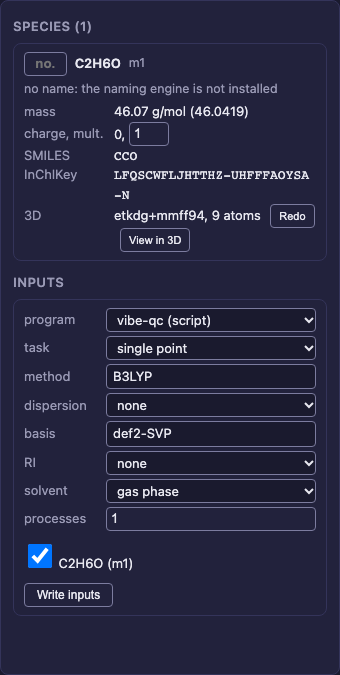
Choose vibe-qc (script), check the settings and selected species, then choose Write inputs. Preparing the script does not require a running queue.
Write and inspect the input
Click Write inputs. With this single species selected, the browser
downloads one Python file. Its name is usually m1_b3lyp_def2-svp.py; the
species id can differ in a document that has been edited.
Open the file in a text editor. It imports Atom, Molecule and run_job
from vibeqc. Its calculation call should contain:
run_job(
    molecule,
    method="rks",
    functional="b3lyp",
    basis="def2-svp",
    output="m1_b3lyp_def2-svp",
    output_qvf=True,
    write_molden_file=True,
)
The Molecule has charge=0 and multiplicity=1. Its GEOMETRY list has
nine atoms with coordinates in angstrom; the script converts them to bohr
for vibe-qc. Coordinate values may differ between geometry-generation
versions; the molecular identity and atom count should agree. Save the sketch
again to retain its 3D structure.
The downloadable CLI and Python examples produce the same vibe-qc script with the same method, basis and task. The processes field sets the CPU request when submitting through vibe-queue.
Run a calculation when ready
Writing an input has not run or submitted a calculation. To run it directly, use the Python interpreter from your working vibe-qc installation:
/path/to/vibe-qc/.venv/bin/python m1_b3lyp_def2-svp.py
Replace the interpreter path and input filename with your actual files.
For queued work, first configure vibe-queue and register vibeqc as described in
Inputs. Submit to vibe-queue then prepares and submits
the selected job, and Calculations reports its state.
Choose only settings that the vibe-qc writer supports. The writer reports unsupported requests instead of dropping options.
The reaction-to-publication tutorial
continues through configuring a local queue, submitting to vibe-qc, following
the runs and retrieving the calculation outputs with vq.
Calculation-result QVF files can be reopened to recover their structures. When editing a result, use Save As to a different file: the sketcher does not retain every calculation payload. Use vibe-view for detailed result inspection.
Optional: write an ORCA input
If your workflow also uses ORCA, change program to ORCA. Keep the
method, basis and other settings above, and set MB each to 2000.
Write inputs then downloads an .inp file containing
! B3LYP def2-SVP TightSCF, %maxcore 2000, %pal nprocs 1 end, and a
geometry block beginning * xyz 0 1. Running that file requires a separate
ORCA installation. See the ORCA writer reference for its
supported options.