Exchange structures and keep calculation results intact
Start with the Diels–Alder VSK. This exercise distinguishes opening a complete document from adding another structure, then carries the sketch through the available file formats. The example archive contains the exchange files, geometries and writer specifications used here.
Open a document, then append a structure
Choose Open… and select the VSK. The canvas should show three species and one reaction, without adding it to your previous document.
Open lactic-acid.vsk for a separate exercise. Choose Import ▾ → SMILES…, enter
Oand accept.The existing lactic acid remains and water appears beside it. Check for two species cards. Save this exercise under a new name.
Undo the import if you need the one-species document again. Do not append arbitrary molecules to the balanced Diels–Alder example and interpret the result as a new reaction.
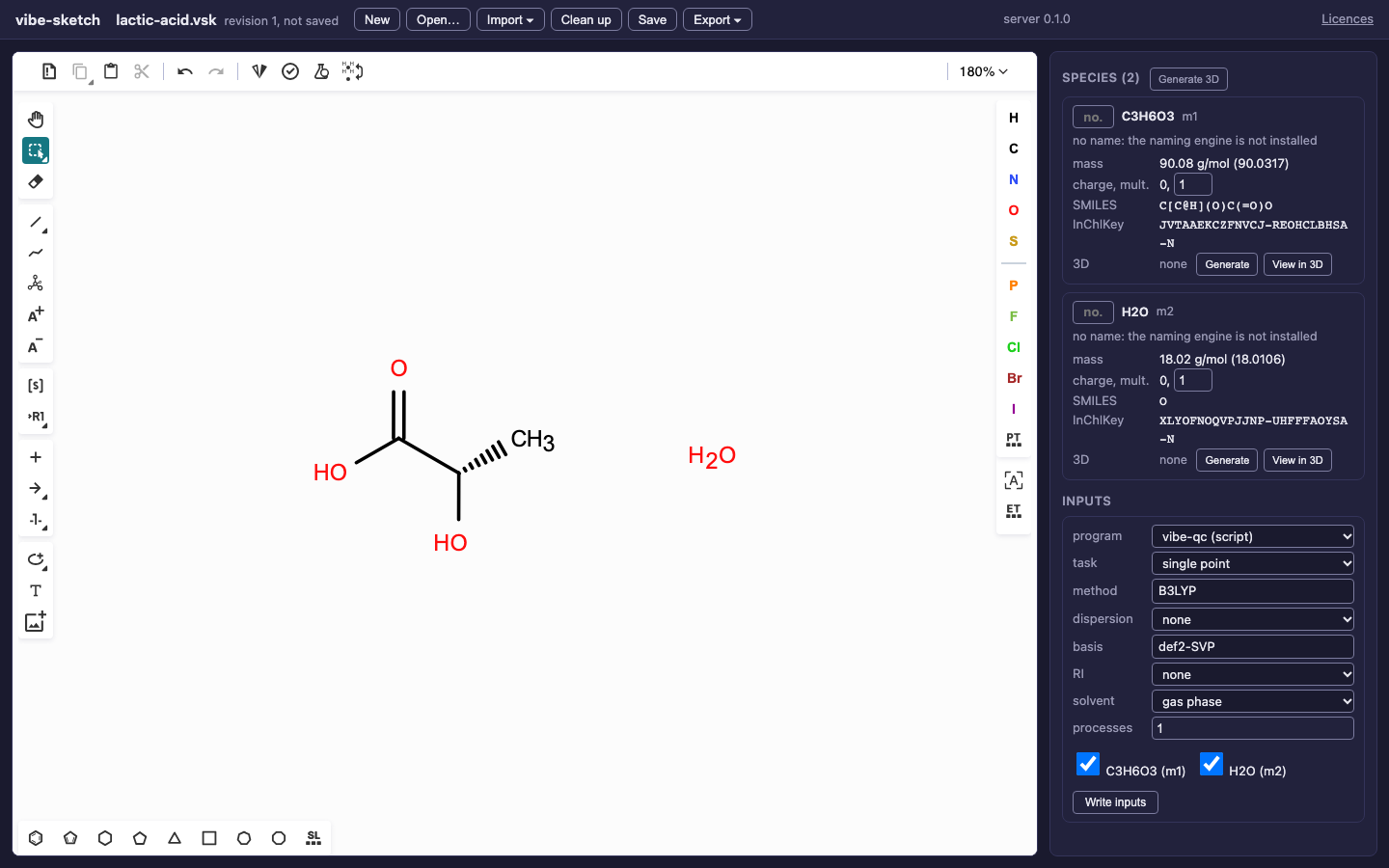
Import adds to an existing drawing. Open creates a document from the selected file.
Choose a format for the information you need
Run the example generator:
python named_reactions.py named-reaction-files
Choose a directory that does not exist. It checks formulas after each
Diels–Alder round-trip and produces the formats/ directory below.
QVF generation needs the optional qvf-writer integration from
installation. The downloadable archive is already generated.
File |
Try it |
What to retain separately |
|---|---|---|
|
Open; save; reopen |
These are the editable document formats. |
|
Open; inspect drawing and arrow |
Calculation jobs and 3D caches belong in QVF/VSK. |
|
Open all disconnected molecules |
MOL has structures and drawn coordinates, not reaction roles. |
|
Open its three records |
SDF includes species fields but is not the whole sketch document. |
|
Open; inspect both sides of the reaction |
RXN holds one reaction. A multi-step document is refused on export. |
|
Open; inspect the |
SMILES does not retain canvas layout, job history or conformers. |
|
Open; inspect three species |
InChI identifies structures, without reaction roles or drawing layout. |
|
Open; inspect the large connected chain |
A synthetic 1,000-carbon import example, not a proposed molecule to calculate. |
MOL chooses V3000 above 999 atoms or bonds. Charges, isotopes, radicals and stereo remain part of the chemical structure; a format is not permission to discard an unsupported feature silently. Check warnings after import.
For CDXML, open the supplied minimal ethanol CDXML. This synthetic example exercises structure import; it is not a claim of complete ChemDraw fidelity. CDXML export is planned.
Open an XYZ from inputs/xyz/ in the archive. Its charge= and
multiplicity= comment fields are read and its coordinates become the
species’ 3D geometry. Multiple frames of the same molecule retain the last
frame. Without stated bonds, the importer must perceive them: inspect charges,
bond orders and warnings, especially for radicals and metals. Periodic
structures are refused. Use vibe-view for detailed 3D inspection.
Names are another import source: Import ▾ → Name… uses the installed vibe-qc naming engine’s supported vocabulary. If it is unavailable or the name is unknown, follow the install hint or use a checked SMILES instead. The properties exercise explains name confidence.
Import a vibe-qc result safely
Fetch a completed result from the vq tutorial
and open its .qvf. Inspect the imported structure, charge and multiplicity.
The original can contain wavefunctions, frequencies, trajectories and logs
that the sketch document cannot reproduce.
In the desktop app, Save therefore opens Save Sketch Copy, suggesting a different name. Accept a new QVF or VSK path. Subsequent saves use that copy. Cancel leaves the original file and unsaved revision unchanged. Choosing the original result path again is refused. The same protection covers symbolic links, unknown extra payloads and damaged archives. See the desktop walkthrough for the actual dialog.
A native sketch QVF can be saved in place if all its data can be reproduced. A QVF extension alone is not enough: the archive’s content decides. Keep the original result for analysis in vibe-view. A general Sketch QVF document or job set is not a direct input to vibe-qc’s current single-job runner; use the generated vibe-qc Python inputs for the calculation workflow here.
Send a geometry to vibe-view
With vibe-view installed, select View in 3D on the relevant species card. If vibe-view opened the sketcher, Send to vibe-view uses that handoff instead. Generate 3D first when needed. From a terminal:
vibe-sketch view lactic-acid-3d.vsk --species m1 --embed
Use the actual id printed by vibe-sketch info. Detailed atom/group editing
and result inspection belong in vibe-view. This handoff is a structure QVF,
not a transfer of calculation results from an imported result archive.
A standalone launch selects a free loopback port and waits for the new viewer’s ready message. An existing viewer can stay open. If startup fails or takes more than 45 seconds, the sketcher reports the reason and a local launch-log path. Start the sketcher from vibe-view’s Sketch action when you want to send structures back to that existing viewer instead.
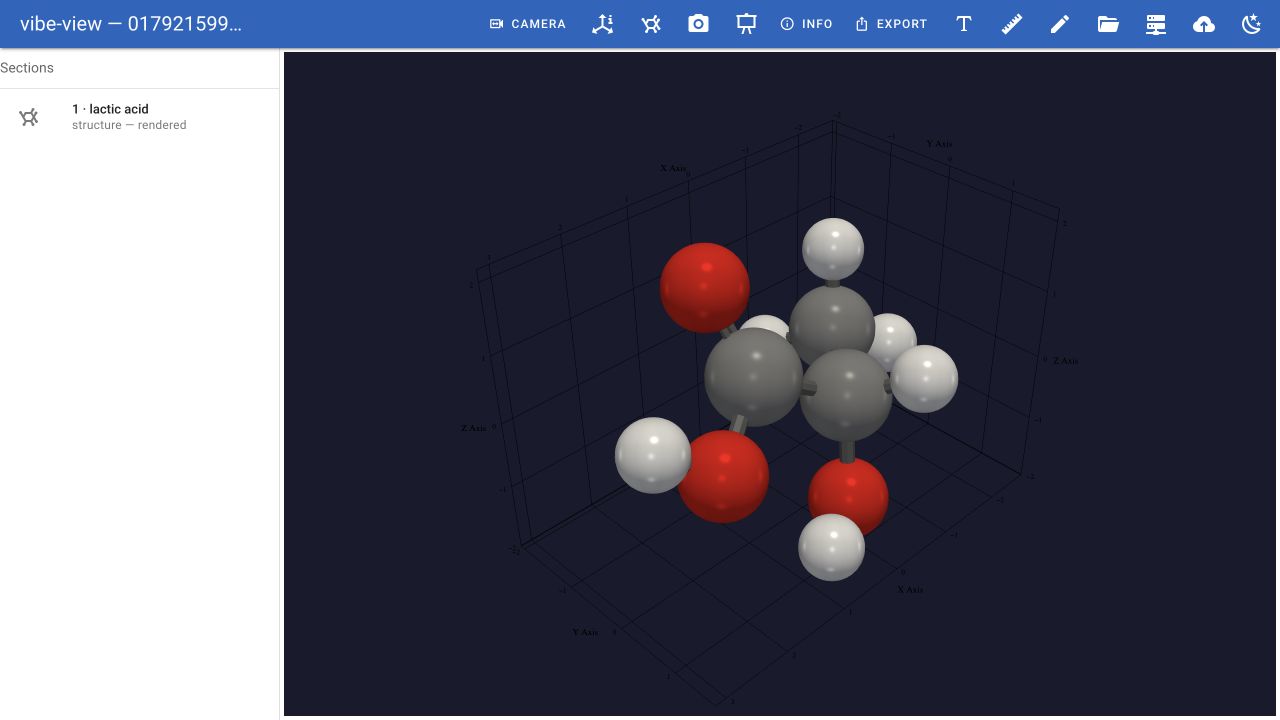
The prepared lactic-acid structure in vibe-view. This is the geometry handoff, not a completed quantum calculation or transfer of result payloads.