A reaction sketch
Draw the esterification of acetic acid and ethanol to ethyl acetate and water. This example teaches reaction import and inspection; it does not predict reaction conditions, kinetics or yield.
For manual drawing, publication checks and a complete calculation workflow,
follow Draw a reaction, publish the figure and run it with vibe-qc.
That tutorial draws a hydrogenation from ring and bond tools and submits its
three species through vq.
Start the app as in Your first molecule. Save your current document, then click New.
Import the scheme
Choose Import ▾ → SMILES… and paste:
CC(=O)O.CCO>>CC(=O)OCC.O
The dot separates molecules on one side; >> separates reactants and
products. Click Clean up after import.
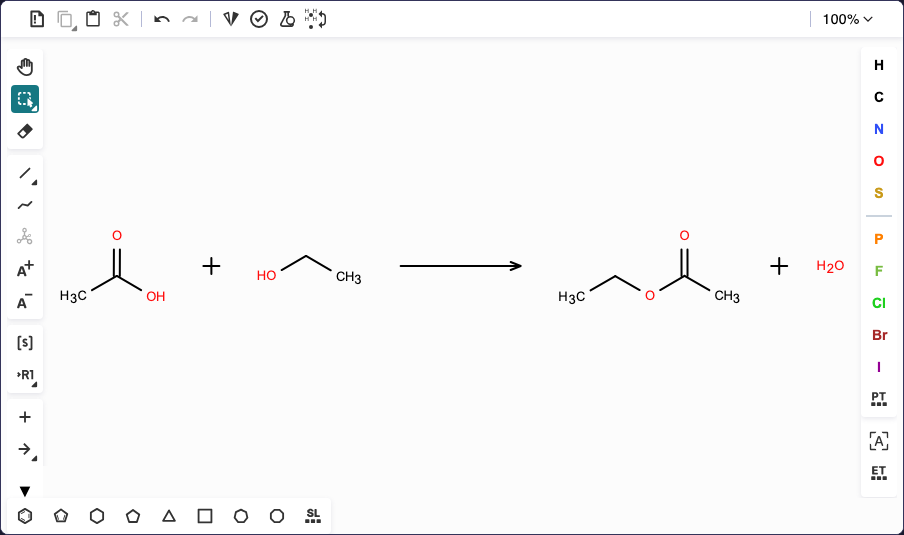
The imported reaction contains two reactants, two products and a forward arrow. The screenshot shows the canvas portion of the app.
Check the interpretation
The properties panel should contain four species and one reaction. Scroll through the species cards and match their formulas to the drawing:
Molecule |
Formula |
Role |
|---|---|---|
Acetic acid |
C2H4O2 |
Reactant |
Ethanol |
C2H6O |
Reactant |
Ethyl acetate |
C4H8O2 |
Product |
Water |
H2O |
Product |
Each has charge 0 and multiplicity 1. In Reactions, check that the arrow’s
reactants and products match the table. The server derives those roles from
the drawing, so moving molecules across the arrow can change their roles.
Species ids such as m1 identify the cards; they are not chemical names.
To add a condition, choose the canvas Add text tool (the T icon) and
click just above the arrow. Enter acid catalyst in the Text Editor and
click Apply. The condition should appear under the reaction in the
panel. Treat it as an annotation supplied by you; the sketcher does not
validate the reaction’s feasibility. The drawing reference
explains how positions, arrows and text are interpreted.
Save and export
Save the whole sketch as QVF or VSK. To try an existing document, download esterification.vsk and open it with Open…. That starting file contains the imported scheme without additional condition text.
Choose Export ▾ → SVG for a figure, or RXN to exchange the reaction with another chemistry program. Keep the QVF or VSK as your editable master: exchange formats do not preserve all sketch metadata.
The current SVG exporter composes the scheme into rows from the interpreted reaction; its arrangement can differ from the canvas. Browser PNG export rasterizes that SVG; the server/CLI PNG renderer accepts a single structure. Exact canvas-layout rendering and PDF export are planned. Use SVG for this example, and check the downloadable SVG before using it in a manuscript.
