Running a calculation as a QVF container¶
Note
QVF track, part 2 of 3. Read The QVF file format, end to end first for the section kinds; Adopting QVF in your own code follows this page. The whole section is indexed at QVF and vibe-view.
You will learn: how a .qvf archive can be the calculation rather
than only its results: you build a pending container from a
structure plus a job specification, run it, and get the same file back
carrying the results, the full log, the citations and the system
manifest, marked done. You will do it three ways: from Python, through
the vq queue as a single-file payload, and
straight from the vibe-view Job Manager.
This is the lifecycle companion to The QVF file format, end to end, which covers the section kinds themselves. Here the interest is the round trip.
Prerequisites:
vibeqcinstalled with a working SCF setup (any Fundamentals tutorial).Optional:
vqfor the queue section,vibe-viewfor the GUI section.
Time to complete: about 10 minutes.
The repository includes two styles of runnable companion:
examples/input-qvf-container-roundtrip.pyperforms the molecular lifecycle end to end in one process and verifies the embedded log.examples/qvf_containers/separates construction,vibeqc run, and inspection so you can see the file change at each step. It includes both molecular and periodic jobs.
Why a container¶
A .qvf normally answers “what came out?”. A container also answers
“what went in?” and “did it finish?”, so one file is the whole
record:
section / field |
carries |
|---|---|
|
the geometry (and lattice + |
|
the declarative request: method, basis, functional, charge, multiplicity, k-points, tasks |
|
|
|
the verbatim input, the full log, the |
|
the BibTeX for the level of theory actually used |
That matters for reproducibility (the input travels with the numbers), for transfer (one file each way instead of a directory), and for review (open the file and read the log that produced the plot).
1. Build a pending container¶
import vibeqc as vq

mol = vq.Molecule(
    [
        vq.Atom(8, [0.0, 0.0, 0.2217]),      # bohr
        vq.Atom(1, [0.0, 1.4309, -0.8867]),
        vq.Atom(1, [0.0, -1.4309, -0.8867]),
    ]
)

path = vq.write_pending_qvf(mol, "water_job", method="rhf", basis="sto-3g")
print(path)  # water_job.qvf
Nothing has run yet. The archive holds exactly two sections and says so:
import json, zipfile

manifest = json.loads(zipfile.ZipFile("water_job.qvf").read("manifest.json"))
print(manifest["provenance"]["run_status"])                     # pending
print(sorted({s["kind"] for s in manifest["sections"]}))        # ['job.spec', 'structure']
A consumer must not guess a status that is absent; QVF spec § 3.2 makes
an omitted run_status mean “not stated”, which is why a pending
container states it explicitly.
The request is declarative JSON data, not Python source. vibeqc run never
executes a run.record.input member, so opening and viewing an archive is
not one click away from running arbitrary embedded code.
2. Run it¶
$ vibeqc run water_job.qvf
The log streams to your terminal and to water_job.out exactly as a
normal run, and the same archive is updated in place:
manifest = json.loads(zipfile.ZipFile("water_job.qvf").read("manifest.json"))
print(manifest["provenance"]["run_status"])              # converged
print(manifest["provenance"]["scf_energy"])              # {'value': -74.9630..., 'units': 'Eh'}
print(sorted({s["kind"] for s in manifest["sections"]}))
# ['atom_properties', 'bond_orders', 'citations', 'job.spec',
#  'run.record', 'scf_history', 'structure', 'wavefunction.gto']
The original job.spec is preserved byte-for-byte, so the settled
archive still shows what was asked for alongside what came back. The
embedded log is the complete .out; the .system manifest rides along
as a run.record attachment.
Re-running a settled container is refused unless you pass --force,
which appends a second, sequenced run.record rather than overwriting
the first.
A calculation that fails settles too. A non-converged SCF makes the
runner raise (it refuses to publish a failed energy as a result) and
the container is finalized as failed with whatever log exists, so a
consumer watching the job sees it end instead of a running snapshot
frozen forever.
Inspect either the pending or settled state with the companion utility:
$ python examples/qvf_containers/inspect_job.py water_job.qvf
It validates the archive and prints its spec, status, section kinds, and
sequenced run history. A terminal container counts as complete only when
its status is converged or failed and its latest run.record contains
both input and the full, possibly empty, log.
The same file is directly viewable without a display server:
$ vibe-view show water_job.qvf --info
$ vibe-view show water_job.qvf --plain
$ vibe-view tui water_job.qvf
Use vibe-view open water_job.qvf for the graphical section browser.
3. Try the periodic route¶
The periodic companion builds one helium atom in an eight-bohr cubic cell and requests the basis-free SCC-DFTB route at Gamma. It is intentionally small so this remains a container tutorial rather than a solid-state benchmark:
$ python examples/qvf_containers/build_periodic_he_job.py
$ vibeqc run examples/qvf_containers/runs/he-periodic-scc.qvf
$ python examples/qvf_containers/inspect_job.py \
    examples/qvf_containers/runs/he-periodic-scc.qvf
write_pending_qvf accepts a PeriodicSystem in the same way as a
Molecule, with kpoints=[n1, n2, n3] in the declarative spec. Native
constructors use bohr while QVF stores structure coordinates and lattice
vectors in angstrom; the writer and reader perform that round trip.
4. Send it through the queue¶
vq treats a .qvf payload as a first-class job: it recognizes the
suffix, resolves the pinned runtime to its installed CLI, and runs
vibeqc run job.qvf. Only the container moves.
$ vq submit HOST water_job.qvf --program vibeqc-dev
$ vq fetch HOST JOBID --name water_job.qvf -o results/
fetch --name publishes that one file atomically and leaves the
operational logs server-side. Because the update is in place, what you
fetch is the same archive you submitted, settled.
The managed runtime’s full Git SHA is snapshotted automatically and checked
again before dispatch, so routine submissions need no version or SHA flag.
Use --expected-sha FULL_40_HEX_SHA only as an extra assertion for a
historical reproduction. While the job runs:
$ vq status HOST JOBID --json
$ vq tail HOST JOBID --name water_job.out
The JSON status includes qvf_lifecycle; its done field uses the same
terminal-status plus complete-run-record rule described above. A settled
container is refused through vq too unless submission explicitly includes
--qvf-force.
5. Submit one from vibe-view¶
Open any structure in vibe-view, click Submit to vq cluster, and
leave Submit as QVF container on. The viewer writes the pending
container from the structure on screen plus the method / basis fields,
submits it as the whole payload, and tags the job qvf-container. When
it finishes, the Job Manager’s open action loads the settled archive
directly, including its Run Record and Job Spec panels.
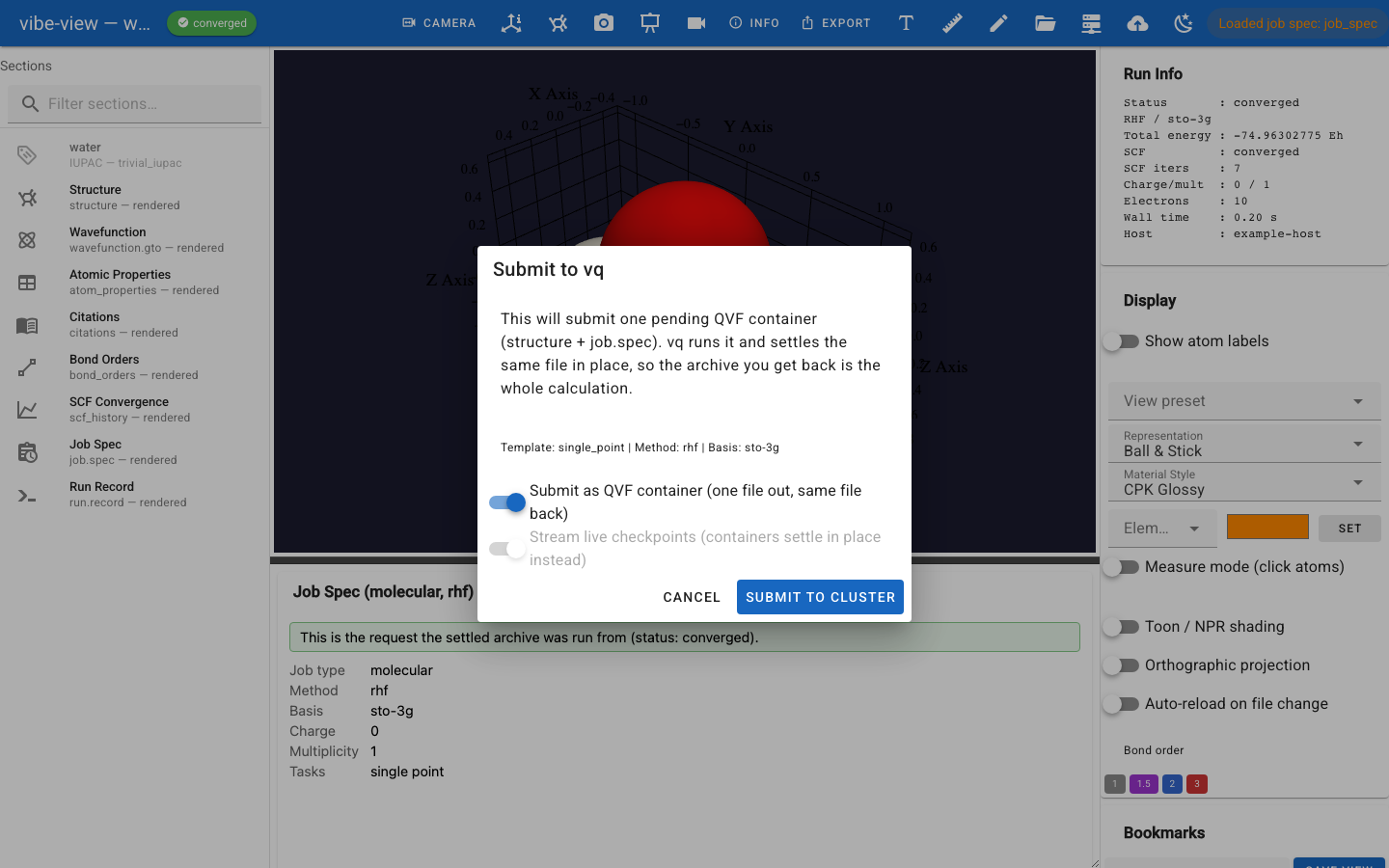
The submit dialog in container mode. Live checkpoints are greyed out
because a container settles in place rather than emitting a separate
checkpoint archive, and the .py input field is hidden: there is no
script in this mode.¶
The switch is disabled when vibeqc is not installed next to
vibe-view: writing a pending archive is a producer action, and
vibe-view is a consumer that does not depend on the producer. In that
case the viewer submits its generated Python script instead, exactly as
before.
The panel itself is documented in vibe-view’s own user guide (vq Job Manager); see also vibe-view here.
What you built¶
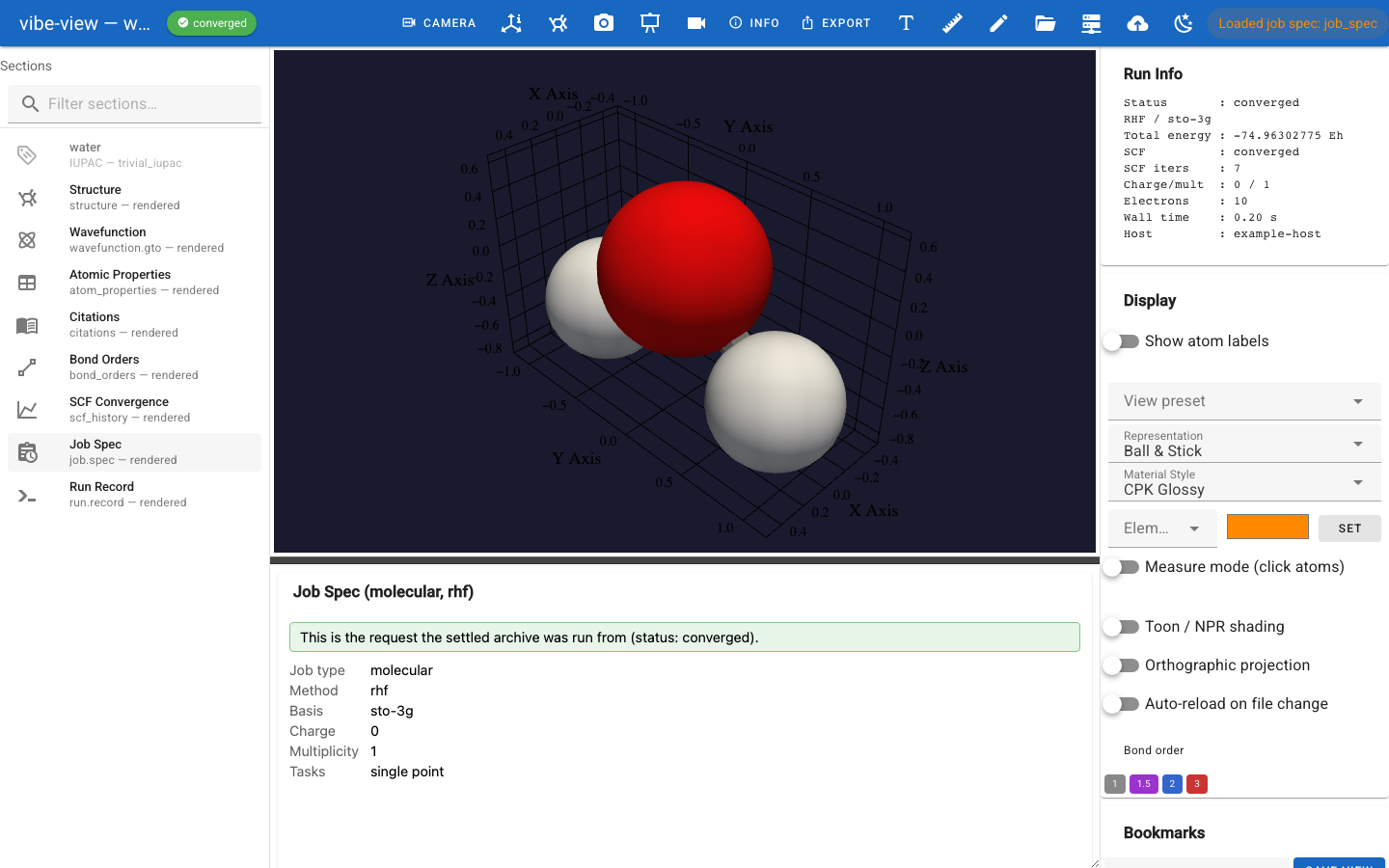
The settled container open in vibe-view. The lifecycle chip beside the
filename reads converged, Run Info leads with the status, and the
sidebar carries Job Spec and Run Record alongside the results, with
the Job Spec panel showing the request the archive was run from.¶
One file now holds the request, the results, the log, the references and the system manifest, and states its own lifecycle.
Next in the track: Adopting QVF in your own code, the producer’s view from outside vibe-qc: the manifest schema, the section-kind vocabulary, the sha256 verify-before-use contract, the vendor namespace, and the conformance corpus to certify against.
Sideways from here: The QVF file format, end to end for the section kinds in depth, or vq: running a remote job for the queue in general.